FOR COLLEGE & UNIVERSITY INSTRUCTORS

Faculty Accessibility Syllabus Toolkit

Start the term with a clearer syllabus.

$39.00

Build from an editable structure, compare three completed examples, and check the details students need to find. A practical starting point for your next course.

  • 12 files: 11 Word documents + 1 PowerPoint
  • Three examples: in-person, seminar and online
  • Individual instructor license
See the template excerpt and file list

Digital delivery after successful payment. Downloads & refunds

Accessibility-informed. Your finished document still needs testing.

LOOK INSIDE

A starting point you can actually edit.

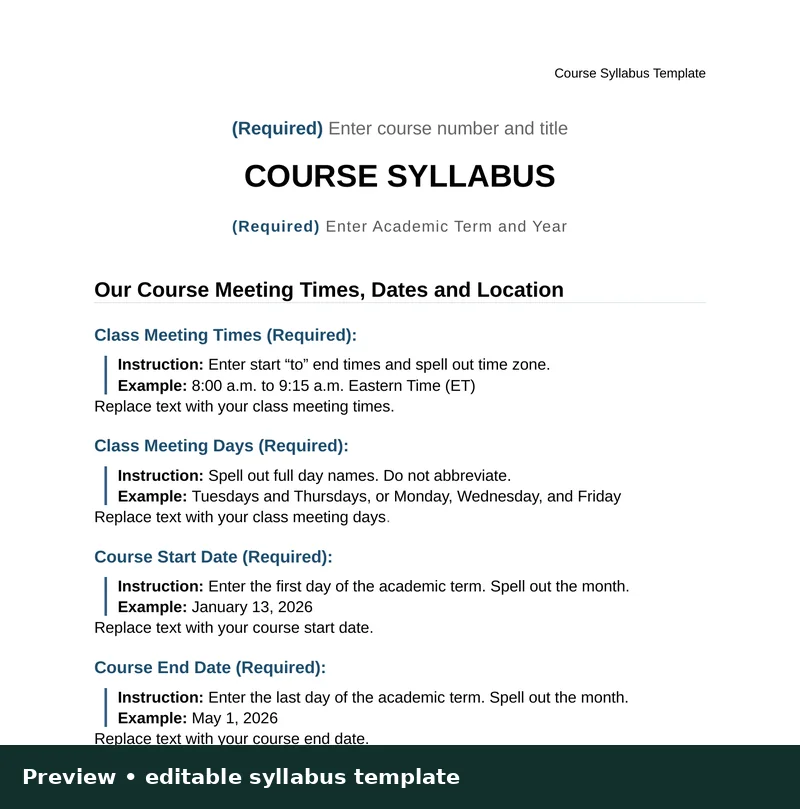
The syllabus template pairs prompts with instructions and examples. Replace them with your own course details, then remove the instructions before sharing your finished syllabus.

The excerpt shown here comes from the included Word template. It is reformatted for this website; the purchased file is editable in Word.

Read the free syllabus-checking guide
FROM THE INCLUDED SYLLABUS TEMPLATE

Our Course Meeting Times, Dates and Location

Class Meeting Times (Required):

Instruction: Enter start–to–end times and spell out time zone.

Example: 8:00 a.m. to 9:15 a.m. Eastern Time (ET)

Class Meeting Days (Required):

Instruction: Spell out full day names. Do not abbreviate.

Example: Tuesdays and Thursdays, or Monday, Wednesday, and Friday

THE COMPLETE BUNDLE

Twelve files for the work around your syllabus.

One ZIP download: 11 editable Word documents and an 8-slide PowerPoint deck. The 12 files include three completed syllabi and the individual-use license.

DOCX

Syllabus template

Build your course document with prompts, instructions and examples.

3 DOCX

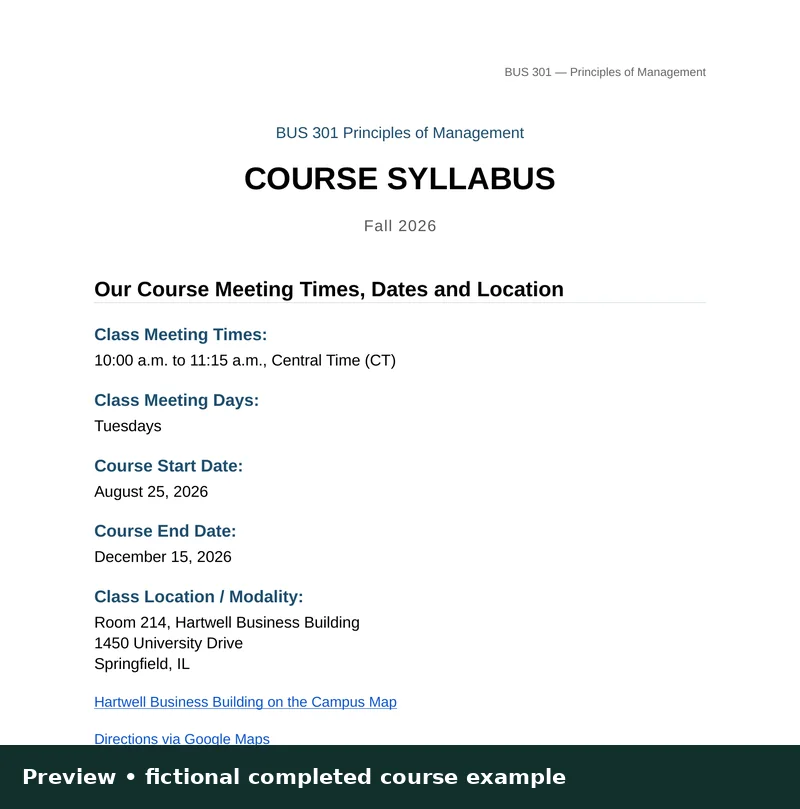
Three completed syllabi

Compare in-person, seminar and online course examples as you write.

DOCX

Quick-start guide

Find your starting point and work through the materials.

DOCX

Accessibility guidance

Understand the document choices behind a clearer syllabus.

DOCX

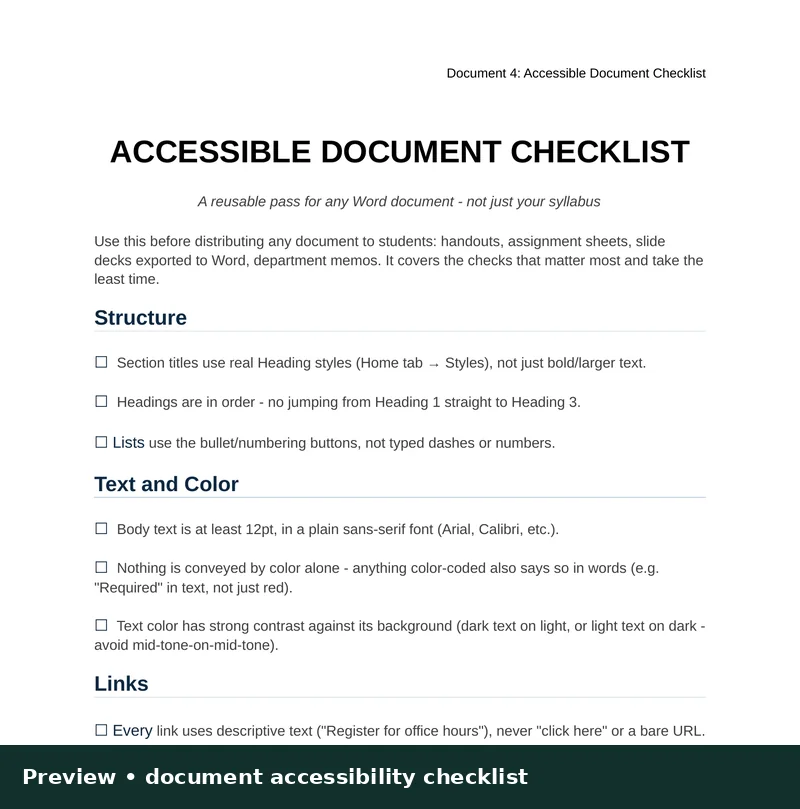
Document checklist

Review headings, links, tables and other document essentials.

DOCX

Policy language swap file

Adapt options for late work, AI use and attendance to your institution.

DOCX · 4 emails

Student email pack

Prepare your welcome, first-week check-in, missing-work response and term wrap-up.

DOCX

Meet Your Professor

Introduce yourself and help students know how to connect with you.

PPTX · 8 slides

First-day slide deck

Bring course information into your opening class presentation.

DOCX

Individual-use license

Keep the terms for reuse in your own courses and future terms.

BEFORE THE NEXT TERM

Prepare once. Review every term.

  1. Choose a starting point

    Read the quick-start guide, then open the Word template and compare the in-person, seminar, and online examples.

  2. Make it your course

    Use the template and policy language options to adapt dates, grading, communication and policies to your course and institution.

  3. Prepare the first week

    Adapt the four student emails, Meet Your Professor document and eight-slide deck so your introduction matches your course.

  4. Check before sharing

    Use the checklist, Word’s accessibility checker, and a final review of the document students will receive.

MAKE AN INFORMED CHOICE

Built for individual instructors.

Useful when you are preparing a new course, revising an existing syllabus, or bringing course information into a more consistent structure.

Research-informed, with clear limits

Developed from university-syllabus usability comparisons and document-accessibility guidance. The toolkit does not certify your finished syllabus or replace institutional policy review. Your edits and final testing matter.

One instructor may edit and reuse the materials for their own courses and future terms. Department-wide sharing requires a separate license.

BEFORE YOU BUY

A few practical questions.

What will I download?

A ZIP with 11 Word documents and one PowerPoint deck. The 12-file bundle includes the template, three completed examples, guidance, communication resources and license.

Can I use it for more than one course?

Yes. The individual license allows one instructor to edit and reuse the materials for their own courses and future terms. Sharing the files department-wide or redistributing them requires a separate license.

Does the toolkit make my syllabus compliant?

No. It provides accessibility-informed structure and guidance. Your completed content, institutional requirements and final exported files need their own review and testing.

Can I see something before purchasing?

The template excerpt and full file list are above. The free syllabus-checking guide explains useful checks you can do whether or not you buy.

Full product description and standards references

$39 | Individual instructor license | 12 editable files

Before students judge your course, they read your syllabus.

Your syllabus is more than a list of policies. It is a student's first guide to how your course works, where to find help, what is expected, and whether the information is usable with assistive technology.

A confusing or inaccessible syllabus can create avoidable questions, missed expectations, barriers for students with disabilities, and a poor first impression. Accessibility concerns can also create institutional risk. Buying a template is not a legal safeguard; thoughtfully preparing and testing your course materials is what matters.

Make those checks before the term starts—not after a student encounters a barrier.

Why this toolkit is different

This isn't a generic blank syllabus. It was developed with attention to the user experience of dozens of syllabi from leading universities and informed by accessibility guidance, including Revised Section 508, the current WCAG 2.2 standard, and W3C WCAG2ICT guidance for non-web documents.

It is built to help you assemble a course syllabus that is clear, navigable, and easier to maintain—without rebuilding the structure from scratch each semester.

What your $39 purchase includes

  • Editable Word syllabus template with real heading and table structure
  • Accessibility features explained, with current standards guidance
  • Quick-start guide
  • Reusable accessibility checklist
  • Policy language options
  • Student email template pack
  • Meet Your Professor template
  • Editable first-day PowerPoint deck
  • Individual-use license
  • Three completed syllabus examples: in-person, seminar, and online

12 editable files. Instant digital delivery after purchase.

What you can prevent or improve

  • Avoid confusion: Make grading, deadlines, communication and course policies easier to locate.
  • Improve the first impression: Present the course with clear organization and consistent information.
  • Reduce accessibility barriers: Preserve real document structure, labeled links, readable formatting and other accessibility-informed practices.
  • Save preparation time: Adapt an established structure instead of starting from a blank document.
  • Re-use your work: Update the syllabus each term while keeping the structure consistent.

What this product does—and does not—promise

WCAG 2.2 is the current stable W3C recommendation. Because Word documents are non-web documents, W3C's WCAG2ICT guidance helps interpret applicable criteria. Revised Section 508 incorporates WCAG 2.0 A/AA, and the DOJ Title II web rule cites WCAG 2.1 AA.

The toolkit is accessibility-informed, not a legal certification or guarantee of WCAG 2.2 AA conformance. Institutions and instructors remain responsible for final content, accessibility checks, accommodations and compliance with their policies. Run your document accessibility checker and test the finished file, particularly after exporting to PDF or publishing through an LMS.

Get the Faculty Accessibility Syllabus Toolkit — $39

Sources for standards context:

Faculty Accessibility Syllabus Toolkit

Give your next syllabus a stronger starting point.

$39.00 · 12 files · Individual instructor license

Return to purchase options