
Description
Know what you pay for. Find questions worth asking. Compare before switching.
Premium increases, processing mistakes and poorly explained fees can leave drivers paying more than expected. This self-audit toolkit helps you check the paperwork, request clarifications, compare equivalent quotes and track insurer responses before deciding what to do.
Inside the digital toolkit
- Guided audit workbook (Word, 3 pages): policy inventory, discounts, billing discrepancies, form processing and switching questions.
- 24 AI research prompts (Word): optional help analyzing redacted documentation and preparing questions.
- Six editable insurer letters and scripts (Word): request pricing and discount reviews, fee disclosure, form-processing histories, corrections, quotes and cancellation confirmation.
- Michigan PIP supplement (Word): a checklist of eligibility, forms and evidence questions to verify against current state information.
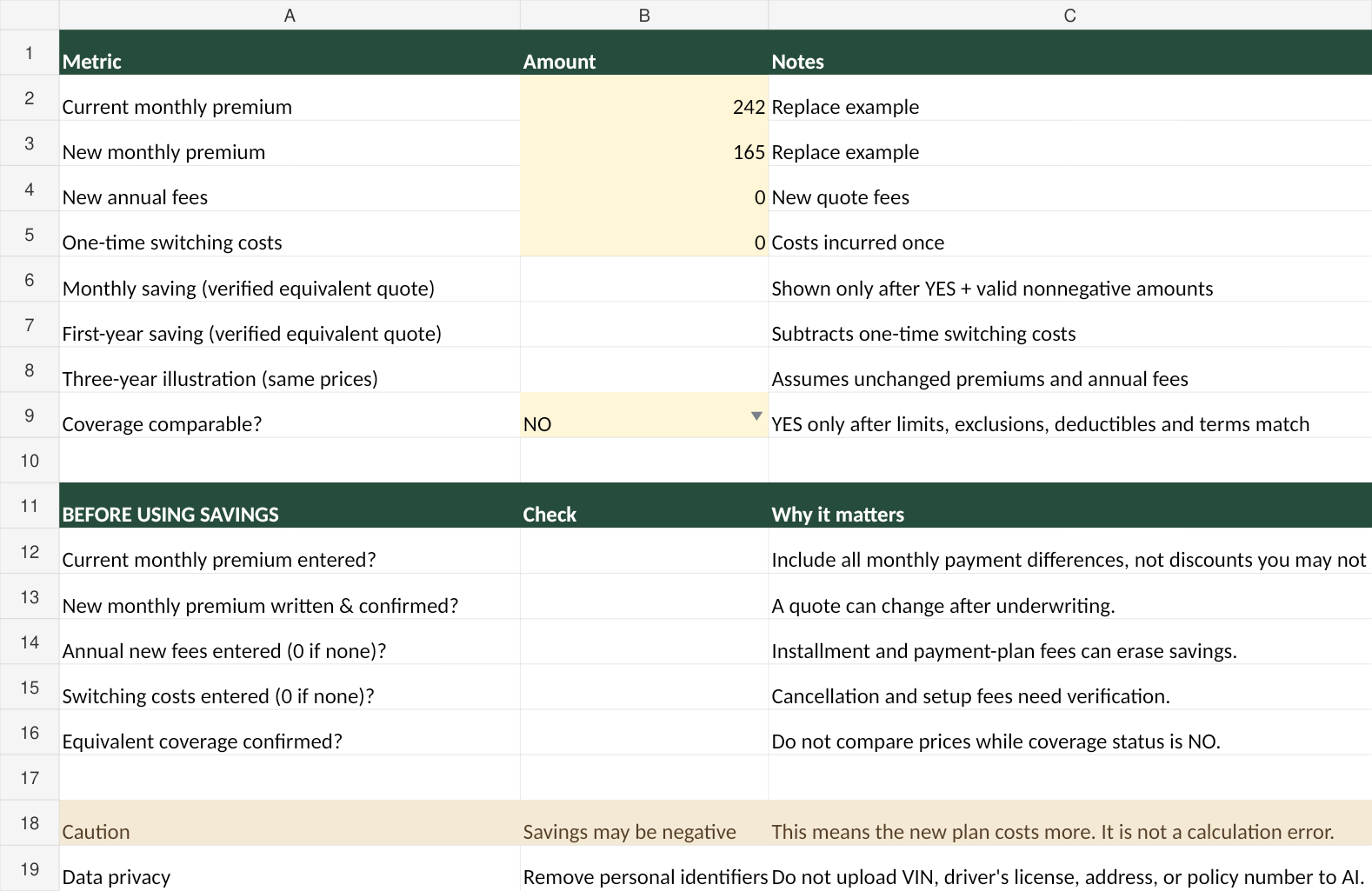
- Six-sheet Excel calculator: monthly/annual/three-year savings estimates, up to six total insurer quote rows, billing audit, forms tracker, discount audit and switching checklist.
- Start-here instructions (TXT): recommended order and privacy safeguards.
Why this is different from a quote-only comparison
Record what you submitted, what the insurer received, what changed, whether a premium or fee was explained and whether the written bill matches your current policy. The savings calculator hides comparison results until you confirm equivalent coverage and enter valid amounts.
How to use it
- Collect declarations, renewal notices, bills and forms.
- Use the worksheets to identify missing information and draft factual insurer questions.
- Research discounts and obtain written quotes with comparable limits, exclusions, deductibles, drivers and effective dates.
- Enter verified amounts, then compare costs and financial exposure.
- Confirm replacement coverage is effective before canceling an old policy.
What you need
DOCX-compatible word-processing software, XLSX-compatible spreadsheet software, and a way to extract ZIP files. AI is optional and supplied separately. Software compatibility can vary.
Important limitations
Educational self-audit and organization materials only. No insurance advice, automatic carrier quotes, live discount database, premium guarantee, claim review, coverage recommendation or legal representation is included. Insurer terms and state requirements vary. Verify coverages and eligibility with your insurer, licensed agent, lender or regulator. No replacement policy should be assumed effective until confirmed in writing.
Protect privacy: redact driver-license numbers, VINs, personal addresses, policy numbers, banking information and other sensitive details before using external AI services. Confirm all AI-generated claims against original documents and official sources.
Digital download: One ZIP with six files; no physical item is shipped. $19 introductory price; $29 regular price.